Closed (fixed)
Project:
Nice Menus
Version:
6.x-1.3
Component:
CSS
Priority:
Normal
Category:
Support request
Assigned:
Unassigned
Reporter:
Created:
7 Aug 2009 at 17:18 UTC
Updated:
23 Sep 2009 at 21:50 UTC


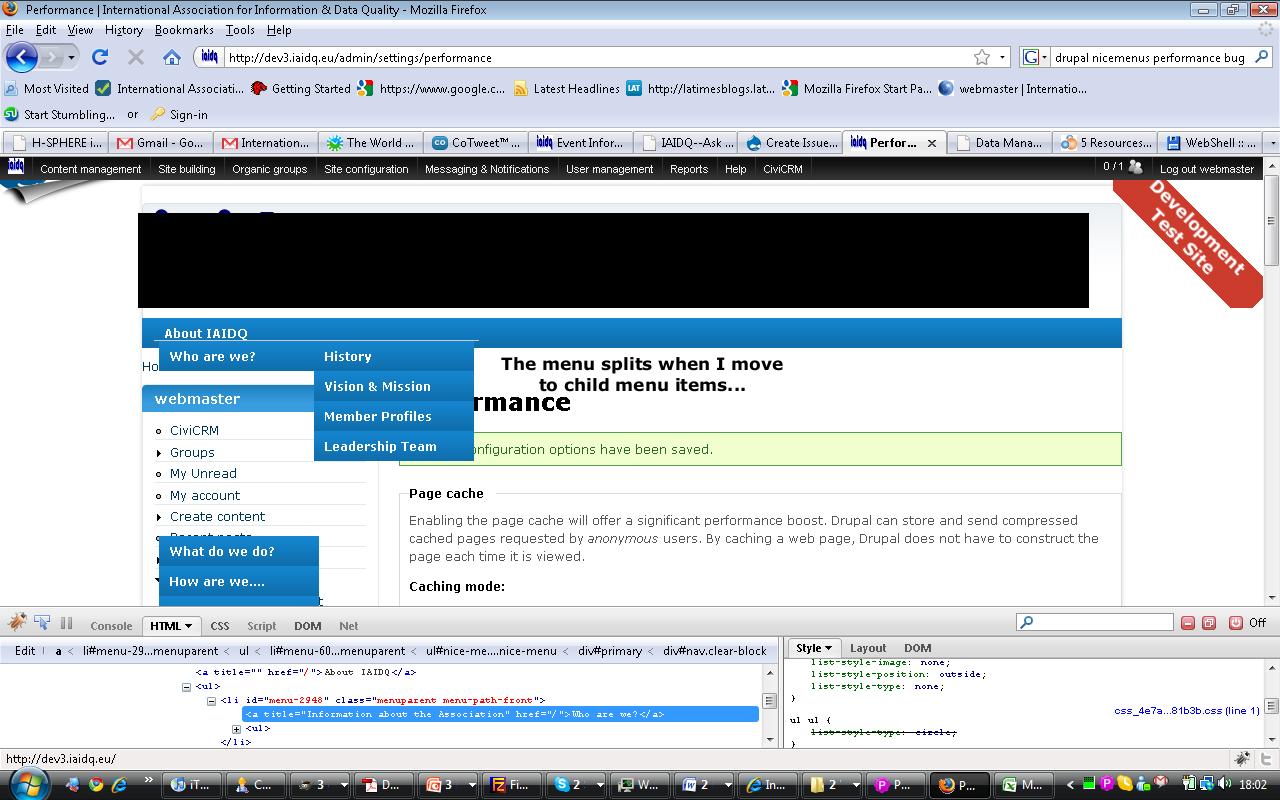
When I enable "optimize CSS" to improve site performance (and stop IE breaking completely) the drop down menu breaks in Firefox (tested OK in Chrome, IE8, Safari, Opera). Child menus items are displayed, but the parent menu item list is pushed down below level of child items.
Probably a simple css tweak required to address this but I'm stumped.
Image of the problem and the specific CSS for the primary links menu that was added to nice_menus_default.css are attached in case anyone can help.
/******************************
 Primary Navigation
******************************/
#nav {
background:transparent url(../images/top_menu_bg.gif) repeat-x scroll 0 0;
}

#primary {
background:transparent url(../images/top_menu_bg.gif) repeat-x scroll 0 0;
}
#primary ul.nice-menu-down {
  float: left;
  border: 0;
background:transparent url(../images/top_menu_bg.gif) repeat-x scroll 0 0;
border-top: 1px solid transparent;
 color:#FFF;
		font-weight:bold;
		padding:0 12px;
		line-height: 30px;
		text-decoration:none;
		display: block;
border-style: none none none none;
}

#primary ul.nice-menu-down a {
color:#FFF;
		font-weight:bold;
		padding:0 12px;
		line-height: 30px;
		text-decoration:none;
		display: block;

}

#primary ul.nice-menu-down li {
  border-top: 1px solid transparent;
 background:transparent url(../images/top_menu_bg.gif) repeat-x scroll 0 0;
color:#FFF;
		font-weight:bold;
		padding:0 5px;
		line-height: 30px;
		text-decoration:none;
		display: block;
border-style:none none none none;

}

#primary ul.nice-menu-down li li {
  border-top: 0;
}

#primary ul.nice-menu-down ul {
  left: 0;
color:#FFF;
		font-weight:bold;
		padding:0 5px;
		line-height: 30px;
		text-decoration:none;
		display: block;

}

#primary ul.nice-menu-down ul li {
  clear: both;
color:#FFF;
		font-weight:bold;
		padding:0 5px;
		line-height: 30px;
		text-decoration:none;
		display: block;
}

#primary ul.nice-menu-down li ul li ul,
/* Repeat for Garland header. */
#primary ul.nice-menu-down li ul li ul {
  left: 12.5em;
  top: -1px;
}

#primary ul.nice-menu-down .menuparent a {
  color:#FFF;
		font-weight:bold;
		padding:0 5px;
		line-height: 30px;
		text-decoration:none;
		display: block;
}

#primary ul.nice-menu-down li.menuparent,
/* Repeat for Garland header. */
#primary ul.nice-menu-down li.menuparent {
 background:transparent url(../images/top_menu_bg.gif) repeat-x scroll 0 0 ;
}

#primary ul.nice-menu-down li.menuparent:hover,
#primary ul.nice-menu-down li.over,
/* Repeat for Garland header. */
#primary ul.nice-menu-down li.menuparent:hover,
#primary ul.nice-menu-down li.over {
background:transparent url(../images/top_menu_bg.gif) repeat-x scroll 0 0 ;
}

#primary ul.nice-menu-down li li.menuparent,
/* Repeat for Garland header. */
#primary ul.nice-menu-down li li.menuparent {
background:transparent url(../images/top_menu_bg.gif) repeat-x scroll 0 0;
}

#primary ul.nice-menu-down li li.menuparent:hover,
#primary ul.nice-menu-down li li.over,
/* Repeat for Garland header. */
#primary ul.nice-menu-down li li.menuparent:hover,
#primary ul.nice-menu-down li li.over {
  background: #003456 url(../images/top_menu_bg.gif right center no-repeat;
}
| Comment | File | Size | Author |
|---|---|---|---|
| error_state_(firefox).png | 104.74 KB | DaraghOB |

Comments
Comment #1
segx commentedThis background style:
#primary ul.nice-menu-down li li.over {
background: #003456 url(../images/top_menu_bg.gif right center no-repeat;
}
Needs to be:
#primary ul.nice-menu-down li li.over {
background: #003456 url(../images/top_menu_bg.gif) right center no-repeat;
}
When ever I get stumped, I always run the CSS through a validator: http://jigsaw.w3.org/css-validator/
Hope that solves your problem.
Comment #2
DaraghOB commentedThanks Segx. Guessed it was something st00pid and blindingly obvious to a fresh set of eyes. Thanks also for the validator link.
Comment #3
DaraghOB commentedOK. Fixed the broken CSS but the issue still exists in Firefox when optimised CSS is turned on in Drupal. When it is turned off the menus function more or less as expected.
I edited the CSS again to replace references to "transparent" with a specific hex colour value (in my case #000080). This corrected the problem.
Comment #4
add1sun commentedComment #5
add1sun commented